How Romp works
Optional reading
You don't need any of this to use Romp. The Internals section is here for when you're curious how it works under the hood. Describes the system as of 2026-07-23; the behaviour it documents moves, so treat anything here as a snapshot rather than a contract.
Romp is one always-on kernel: a single Python process that reads each session's Claude Code transcript, builds an event tree, runs the judges that write the durable records, and serves the five views over HTTP + WebSocket.
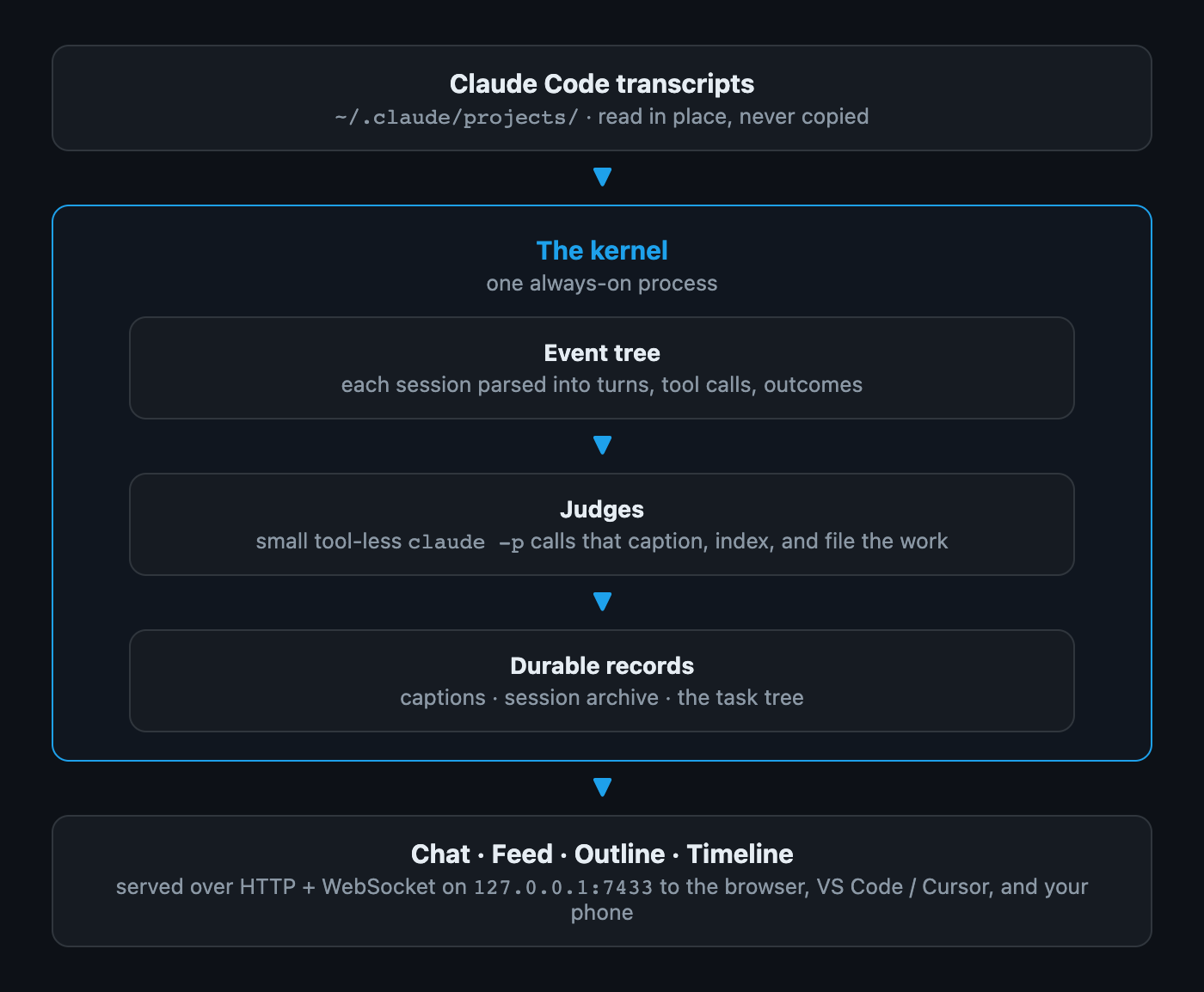
The judges are small claude -p calls with no tools and MCP disabled: they can
caption, index, and file work, but structurally cannot act. They spend a little
of your own Claude quota; that is the cost of the live captions and the task
tree. Their records, timeline events, and mail all live under
${XDG_STATE_HOME:-~/.local/state}/romp/; transcripts are read where Claude
Code already writes them and never copied.
The judges, end to end
Transcripts and peer mail become segments; judges turn segments into events on per-node logs; a deterministic rollup folds those logs into the board. The LLM judges sit between two deterministic layers, so every judgment is recorded and replayable. In the diagram, blue is an LLM board judge (writes goal state), green an LLM caption judge (writes only text), gray deterministic code, yellow data at rest, and pink you.

What the installer sets up
The clone is the installation. Almost everything install.sh adds is a symlink
pointing back into it, so updating the clone updates the installed pieces with
it, and nothing is copied into a second place to drift. It needs no sudo, and
re-running it adds only what is missing.
In your Claude Code config (~/.claude/). Romp works by hooking into Claude
Code, so this is where most of it lands:
- Its hooks are symlinked into
~/.claude/hooks/, then registered in~/.claude/settings.json. That registration is a merge: it adds Romp's entries and leaves every other hook you have registered untouched. romp-postal.mcp.json, the MCP config that gives sessions their mailbox.romp-session-prompt.md, appended to a session's system prompt.- The
romp-postalskill, into~/.claude/skills/.
Running afterwards. A login service, a launchd agent in
~/Library/LaunchAgents on macOS or a systemd --user unit on Linux. It runs
romp-manager, which supervises the kernel on port 29855; the postal bus
takes 25302. Both bind loopback only, so nothing is exposed to your network
until you choose to reach it from elsewhere.
Elsewhere on the machine. A Python virtual environment under
~/.local/state/romp/ for the SDK backend's
dependency, claude-agent-sdk, and for cryptography, which
notifications to a phone or browser
need; if those say the package is missing, bin/romp-sdk-setup installs it.
The VS Code / Cursor extension, built and
installed. A pre-push hook in the clone's own git directory, which does
nothing unless you give it a list of strings to watch for. The one-line
installer also appends a PATH line to your shell rc; install.sh on its own
only prints the line for you to add.
What it does not touch. It installs nothing into your Python, system or
user: the kernel and the CLI are standard library only, which is why those two
packages get that separate venv, built on one Python 3.10+ and rebuilt by
bin/romp-sdk-setup only when you move romp to another Python by setting
ROMP_PYTHON, when the interpreter it was built with is gone and no other of
its version and build remains, or when an interrupted build left it without
pip; the kernel runs ROMP_PYTHON if set, else the interpreter the venv's
pyvenv.cfg records. It reads your Claude Code transcripts where they already
are and never copies them. Every step has an opt-out; see
Install-time switches.
Undoing it. romp-service uninstall removes the login service. After that,
deleting the clone and the ~/.claude symlinks that point into it leaves the
machine as it was, apart from Romp's own state under ~/.local/state/romp/,
which you can delete too.
The rest of this section
The rest of this section drills into each piece:
- Judges: the full roster, who each judge is and when it runs.
- The judge pipeline: every trigger tier by tier, and the card state machine.
- How a card gets its state: the state model, chip by chip.
- The event model: the bottom-layer event tree.
- The read side: the kernel and the panes.